[Guide] for Hero Slots and Troop Formations
Posted: 22 Aug 2026, 15:54
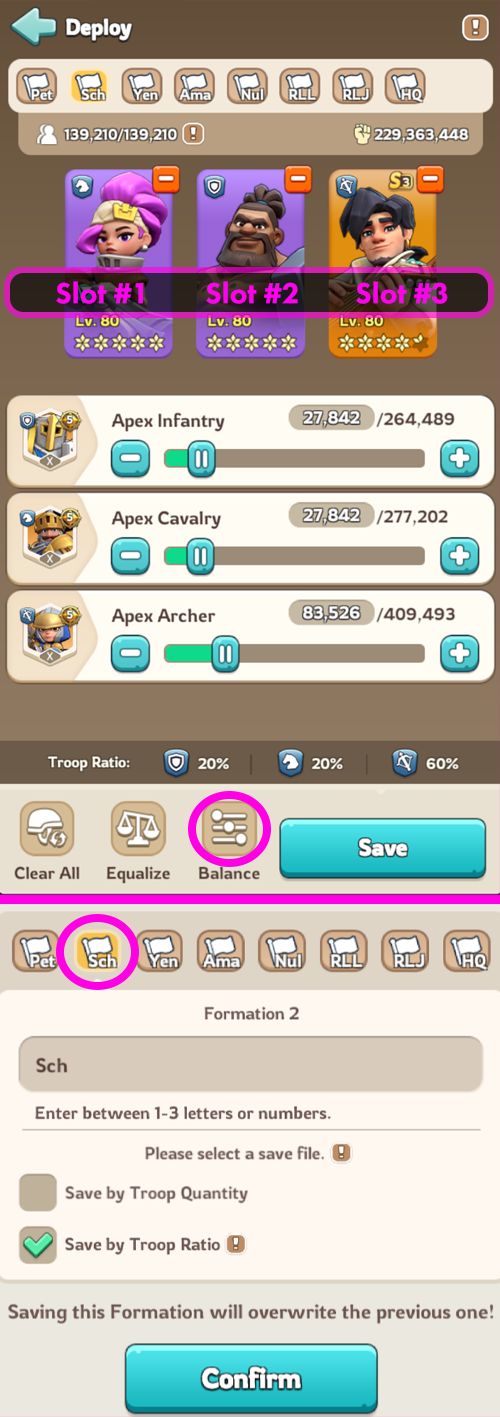 Hero Slots and Troop Formation
To set up right formation for sending or joining rally and saving those formations will makes things easy and fast. After this. you dont accidentally send wrong heroes to Bear Trap etc.
1. Click you Governor image at top left.
2. Choose Squad
3. Choose Formations
4. Choose your heroes first
5. Then change troop ratio by hitting Balance
6. Press Save
7. Coose one of the the quick buttons, where you want that formation to be saved. You can give new name to the button.
8. Choose Save by Troop Ratio if not chosen.
9. And finally hit Confirm
Now when you send your Heroes and Troops, you can choose them from those Quick Buttons.